


Team & Roles
Add staff by their handle and control who can edit what.
Morsly lets you build a team to help run a place. Everyone you add gets one or more roles that control what they can see and do.
In this guide: Understand each role’s permissions, add team members by their handle, and manage who has access to your place.
Before you begin: You need a place on Morsly. If you haven’t created one yet, start with Getting Started.
Roles
- Owner — full access: place details, menu, translations, staff (including other owners), and deleting the place.
- Manager — can edit place details and the menu, manage translations, run imports, and manage staff (except owners).
- Waiter — uses the shift pad to capture guest orders, manage multiple tables, track sent and paid status, and share kitchen tickets. Can also view and share the place’s QR poster.
- Cook, Cashier — service roles with no editing access today; they can view and share the place’s QR poster.
- Translator — scoped to reviewing and approving translations, plus sharing the QR poster.
Someone can hold more than one role at once (e.g. waiter and cashier). The person who creates a place is automatically its owner.
Add a team member
- Go to Staff in your place settings.
- Enter the person’s Morsly handle (their username) — not their email address.
- Add them, then set their role or roles.
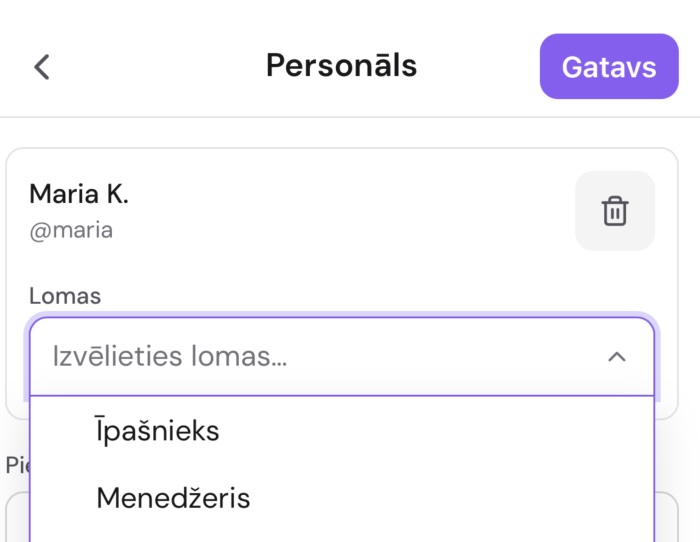
This video may show an older version of the interface.
There’s no email invite step: staff are looked up and added directly by handle. The person must already have a Morsly account — if they don’t, ask them to sign up first, then add them.
Manage existing members
From Staff you can see everyone assigned to the place and change or remove their roles. Only an owner can grant or remove the owner role or hand a place to someone else — removing the last owner from a place isn’t possible while any assignment remains.
This video may show an older version of the interface.
Related guides
- Getting Started — create your place and get started
- QR Codes — anyone on the team can share the QR poster
Frequently asked questions
The person I’m adding doesn’t have a Morsly account. What now? They need to sign up at morsly.libesent.lv first. Once they have an account, you can find them by their handle and add them to your place.
Can someone have more than one role? Yes. A single person can hold any combination of roles. For example, a waiter who also handles translations can be assigned both Waiter and Translator.
How do I transfer ownership to someone else? An owner can grant the Owner role to another team member. The last owner of a place can’t be removed while other assignments exist, so transfer the place first, then step away.
What is a handle, and where do I find it? A handle is the username the person chose when signing up for Morsly. It’s the name they use to log in and the name other people use to find them. Ask your team member for their handle — you don’t need their email.
I accidentally removed someone from my place. Can I undo it? There’s no undo. Add them back by following the steps in “Add a team member” above and reassign their roles.
Need more help?
If you run into something this guide doesn’t cover, reach out through the Contact page.